How to Make a Celebrity Arrival Video with AI
Step 1 — Go to Heyomi
Open your browser and go to heyomi.ai. Sign in to your account.
Step 2 — Select Edit Image
Once inside, go to the Image category and select Edit Image.
Step 3 — Upload Your Selfie
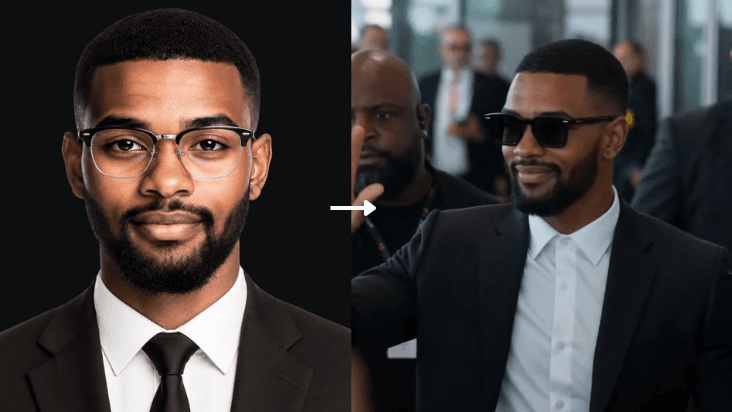
Upload a selfie of yourself. Then in the prompt field, describe the outfit you want — or keep it simple and paste something like:
Make me wear a nice celebrity outfit — a sharp tailored suit or designer streetwear.
Portrait on a plain white background. Photorealistic. Full body visible.
Wait for your image to generate.
Step 4 — Turn It into a Video
Once your image is ready, click Turn to Video. Select Ultra Quality, set the duration to 15 seconds, hit Apply, then paste the prompt below.
The Prompt
Style
Ultra-realistic mass celebrity arrival scene. Single continuous shot. Handheld
camera from crowd perspective with natural micro-shake. No cuts. Documentary-style
realism. Raw, immersive, uncontrolled feel.

Audio
Only natural environmental sound: Loud crowd cheering, people shouting, rapid
camera shutter clicks, phone recordings, airport announcements echoing, footsteps,
fabric movement, distant engine idle and rev.

Lighting
Natural daylight filtering through large airport glass panels. Mixed reflections
on surfaces. Realistic shadows. Slight atmospheric haze for cinematic depth.

Main Character (STRICT REFERENCE)
Use the uploaded image as the exact facial reference for the main character. A
young male with a calm, confident presence and a subtle controlled smile. Face
identity must remain consistent throughout the sequence.

Outfit (STRICT LOCK)
Open black suit jacket over a plain white shirt (no tie)
Wearing sunglasses
Holding a coffee cup
No variation or changes at any point

SCENE BREAKDOWN
0–3s
Handheld camera begins inside a dense crowd behind barricades. Natural shake.
Partial obstructions from heads, shoulders, and raised phones. Screens visible
recording. Crowd loud, chaotic, restless. Camera searches for a clear line of
sight toward the arrival gate.

3–6s
Camera lifts slightly above shoulder level. Focus shifts between moving heads,
waving hands, and glimpses of the arrival gate. Camera flashes burst from media
photographers. Tension and anticipation build as the crowd leans forward.

6–10s
Security personnel suddenly push the crowd back. Camera reacts with a natural
shake and slight repositioning. Through shifting gaps, the celebrity appears in
the distance — initially soft and slightly out of focus, gradually sharpening
as he walks forward with bodyguards.

10–13s
Natural handheld push-in (subtle zoom effect). The celebrity is now clearly
visible, walking confidently at the center. Security clears a path. He raises
his hand and gives a calm wave with a composed smile. Camera struggles to
maintain framing as people move and block parts of the view.

13–15s
Camera tilts and shifts while tracking him toward the convoy. Reveal a green
Lamborghini Revuelto, with a Mercedes G63 and Toyota Innova behind. A bodyguard
opens the scissor door. The celebrity enters quickly, still holding the coffee
cup. Engine revs loudly. Vehicles begin moving. Camera lifts slightly as the
crowd jumps to catch a final glimpse.
Hit Generate and wait for your video.
That's it — no film crew, no location, no budget. Just your selfie and one prompt.
Try it now → Heyomi.ai